Connect a Gauge to FieldLab Mobile app versions 2.0 and later
The following guide applies to:
- FieldLab Mobile app version 2.0 and later.
- All Bluetooth models of Field Gauge LC20 and Process Meter LC30.
LC20 Field Gauges
1. Connect the Bluetooth antenna.
Screw the included Bluetooth antenna into the SMA connector on the back of your Field Gauge(s). Without the antenna connected, the Bluetooth range will be limited to a few feet.
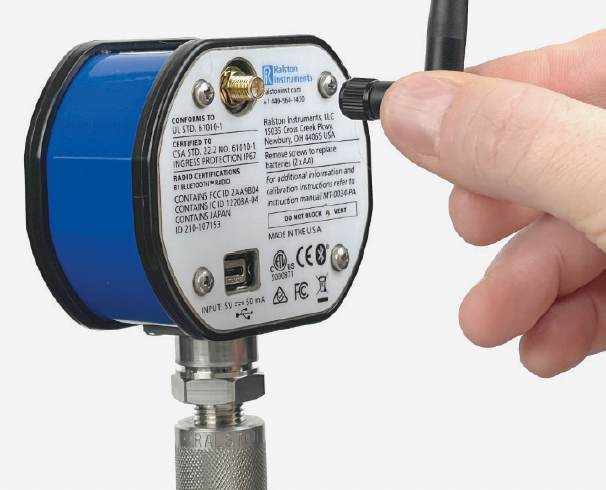
Screw the included Bluetooth antenna into the SMA connector on the back of your Field Gauge(s). Without the antenna connected, the Bluetooth range will be limited to a few feet.
2. Power on the gauge(s).
Press the power button on the front of each gauge.
If you're using a pressure gauge, press and hold the zero button to zero the gauge.
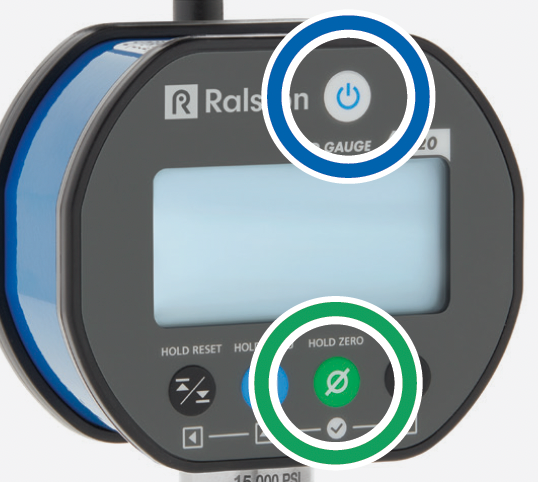
3. In the FieldLab Mobile app, select the Gauges tab.
4. Select the Connect button.
Select Connect for each gauge that you want to use in your test. Once connected, the gauge moves to the top of the Gauges screen and shows Disconnect and Manage buttons.
Note that every Ralston gauge within range will appear on the Gauges screen. Confirm that you are connecting to the correct gauge(s) by comparing the serial numbers on the Gauges screen with the physical gauges you are using for your test. Serial numbers are printed on a white label attached to the gauge's exterior.

Next: Add Readings to a Test
Troubleshooting
Confirm that the gauge is powered on
Confirm that the gauge is not connected to another device
If the gauge is connected via Bluetooth to another mobile device running the FieldLab Mobile app, or a computer running FieldLab Desktop software, it will not appear on the Gauges screen as a nearby gauge.
Check your range
Confirm that your mobile device and the Field Gauge/Process Meter are within range, and that the Bluetooth antenna is firmly screwed in to the back of the gauge.
Line-of-sight range is 100 m (330 ft). The range will be reduced when there are objects between the mobile device running FieldLab Mobile and the gauge. Materials like glass, wood, metal, and concrete can reduce Bluetooth signal strength.
Environmental factors, such as precipitation and humidity, can also impact the radio waves that carry Bluetooth signals.
Confirm the Gauge Bluetooth Radio is ON
Each time you power on the Field Gauge or Process Meter, the Bluetooth Radio is ON by default. However, you or a co-worker may have turned it off to save battery power.
Link to article: Turn Bluetooth radio on or off on a Field Gauge LC20 or Process Meter LC30
Link to article: Turn Bluetooth radio on or off on a Field Gauge LC20 or Process Meter LC30
Confirm Bluetooth is ON on your mobile device
Confirm that the FieldLab Mobile app has permission to access Bluetooth in your mobile device settings
Confirm that the Field Gauge or Process Meter you are trying to connect to is Bluetooth-enabled